Sunday, May 26, 2019

camtesia


Camtasia


By using Camtasia we can edit and customize videos using Camtasia, import media from just about anywhere and create stunning interactive content. It also supports us to Produced video using smoother and it provides a visually appealing look to any of our videos. It consists of a TechSmith fuse which allows users to send all sorts of media directly to the Camtasia bin. It is Integrated with Google drive to allow us to upload videos without a hitch and in turn also allow to import videos in desktop from Google Docs. This ensures a smooth workflow and improved productivity.
It can record high-quality videos in the shortest time possible. Another great thing about Camtasia is that there is no time limit to any video which is recorded. This makes it easier for people who often have to develop tutorials which are varied in duration.To use Camtasia we don’t have to be a professional; anyone can create stunning videos using its green screen effect and remove or add different colors.It is very easy to arrange videos, audios and images on an unlimited number of tracks. It compromises of pre-installed music tracks, images and videos. This way you don’t have to look for relevant material or waste time. Interesting visual effects like cursor effects, shadows, coloring objects and borders allow us to customize our videos and make them look more professional.


It is one the software that help us to do our assignment on time, like it help us to edit our assignment and help us to club short video to make complete video to make more attractive.I have use this software to make my presentation and it is useful to make video tutorials .Below i have use camtaisa to record my video of season. 


If you want to edit a video by using camtasia than I think that give  link below can help you to edit.


Friday, May 17, 2019

How to access Google Classroom


How to access Google Classroom
Before you start using Google Classroom, you'll need to make sure you're signed in to your Google account. If you don't have one, you can review the lesson on creating a Google account to get started.


Google Classroom can be accessed by visiting classroom.google.com. There's also a mobile app that can be download on devices. The mobile app is great for accessing your classroom on the go, but you'll probably have an easier time performing tasks like grading and creating assignments on a computer.
Creating a class
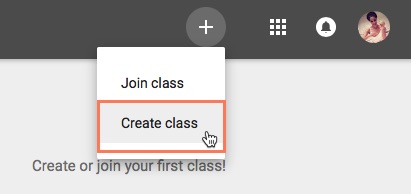
When you open Google Classroom, the first thing you'll need to do is create a class. Click the Plus icon in the top-right corner, and then select Create class.
This will bring up a dialog box asking if you're planning on using Google Classroom at a school with students. Google Classroom requires schools to use G Suite for Education if their teachers plan to use it in their actual classrooms. This provides teachers and students with more privacy and security measures. If you're using Google Classroom for your own personal use, you won't need to worry about this.
You'll then need to enter the name of your class. There's also the option to enter a Section, Subject, and Room if you're using Google Classroom in a school and want to include this information. When you're done, click Create.


Tuesday, May 7, 2019

Use of VLE


Uses of VLE
VLE is a platform where we can able to interact with the online friends to clarify our doubt and also to help others to answer their questions. It is one of the most important ICT tool to use in the classroom to download the resources which is requires for learning that is uploaded by the lectures. VLE also help us to get information faster about the module that is going to be learning in the class. It is an online forum where we can use technology in the learning environment to facilitate group interactions and it is also used to post our question to the friends.

The concept of VLE just appeared in my life, when I started joining in this college. I joined the Paro College of Education in july, 2015, and from the first year itself I have been doing different assignments. I was given an account in Virtual Learning Environment, so that it would serve as a good teaching and learning tool. I have been using the Virtual Learning Environment for three years now and I have been using it effectively when it came to academic discussions, downloading the notes or uploading the assignments. With the four years in this college, I knew that VLE is an online forum for lectures and trainee to share the information so that learning does not frontier within the four walls of a classroom. 

Through VLE teacher can share the information online so that we can learn without face to face interaction. In that way our lectures and trainees at Paro College of Education use VLE as an online form for the teaching and learning purpose in the college. When we logged in VLE, there are many facilities where we can get information by chatting with friends. I can also post questions and ask clarifications which I cannot ask in the classroom. While I use VLE I did not have to go in person to submit my assignments to the particular module tutor. I also get the information what is happening in an around the college in terms of an announcement and day to day life experience. Wherever I go I can log in my VLE account to get information’s at anytime and anywhere without wasting my time.

Therefore, I personally want to recommend that the VLE plays a vital role in teaching and learning in the 21st classroom setting. It provides so many online forums for lectures and trainees at Paro College of education to post and clarify the doubts. I came to learn how to operate the VLE and do many things due to my stay in this college. Thus, for me I learn many things while using online tools. As we all know that online tools have lots of advantages to learn faster and easier but there is also a certain criticism while using online services. It’s in our hand to use technology appropriately and in a positive way.