Sunday, May 26, 2019

camtesia


Camtasia


By using Camtasia we can edit and customize videos using Camtasia, import media from just about anywhere and create stunning interactive content. It also supports us to Produced video using smoother and it provides a visually appealing look to any of our videos. It consists of a TechSmith fuse which allows users to send all sorts of media directly to the Camtasia bin. It is Integrated with Google drive to allow us to upload videos without a hitch and in turn also allow to import videos in desktop from Google Docs. This ensures a smooth workflow and improved productivity.
It can record high-quality videos in the shortest time possible. Another great thing about Camtasia is that there is no time limit to any video which is recorded. This makes it easier for people who often have to develop tutorials which are varied in duration.To use Camtasia we don’t have to be a professional; anyone can create stunning videos using its green screen effect and remove or add different colors.It is very easy to arrange videos, audios and images on an unlimited number of tracks. It compromises of pre-installed music tracks, images and videos. This way you don’t have to look for relevant material or waste time. Interesting visual effects like cursor effects, shadows, coloring objects and borders allow us to customize our videos and make them look more professional.


It is one the software that help us to do our assignment on time, like it help us to edit our assignment and help us to club short video to make complete video to make more attractive.I have use this software to make my presentation and it is useful to make video tutorials .Below i have use camtaisa to record my video of season. 


If you want to edit a video by using camtasia than I think that give  link below can help you to edit.


Friday, May 17, 2019

How to access Google Classroom


How to access Google Classroom
Before you start using Google Classroom, you'll need to make sure you're signed in to your Google account. If you don't have one, you can review the lesson on creating a Google account to get started.


Google Classroom can be accessed by visiting classroom.google.com. There's also a mobile app that can be download on devices. The mobile app is great for accessing your classroom on the go, but you'll probably have an easier time performing tasks like grading and creating assignments on a computer.
Creating a class
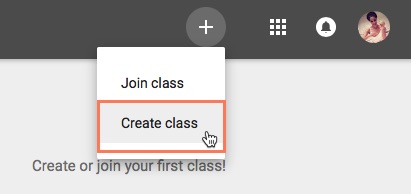
When you open Google Classroom, the first thing you'll need to do is create a class. Click the Plus icon in the top-right corner, and then select Create class.
This will bring up a dialog box asking if you're planning on using Google Classroom at a school with students. Google Classroom requires schools to use G Suite for Education if their teachers plan to use it in their actual classrooms. This provides teachers and students with more privacy and security measures. If you're using Google Classroom for your own personal use, you won't need to worry about this.
You'll then need to enter the name of your class. There's also the option to enter a Section, Subject, and Room if you're using Google Classroom in a school and want to include this information. When you're done, click Create.


Tuesday, May 7, 2019

Use of VLE


Uses of VLE
VLE is a platform where we can able to interact with the online friends to clarify our doubt and also to help others to answer their questions. It is one of the most important ICT tool to use in the classroom to download the resources which is requires for learning that is uploaded by the lectures. VLE also help us to get information faster about the module that is going to be learning in the class. It is an online forum where we can use technology in the learning environment to facilitate group interactions and it is also used to post our question to the friends.

The concept of VLE just appeared in my life, when I started joining in this college. I joined the Paro College of Education in july, 2015, and from the first year itself I have been doing different assignments. I was given an account in Virtual Learning Environment, so that it would serve as a good teaching and learning tool. I have been using the Virtual Learning Environment for three years now and I have been using it effectively when it came to academic discussions, downloading the notes or uploading the assignments. With the four years in this college, I knew that VLE is an online forum for lectures and trainee to share the information so that learning does not frontier within the four walls of a classroom. 

Through VLE teacher can share the information online so that we can learn without face to face interaction. In that way our lectures and trainees at Paro College of Education use VLE as an online form for the teaching and learning purpose in the college. When we logged in VLE, there are many facilities where we can get information by chatting with friends. I can also post questions and ask clarifications which I cannot ask in the classroom. While I use VLE I did not have to go in person to submit my assignments to the particular module tutor. I also get the information what is happening in an around the college in terms of an announcement and day to day life experience. Wherever I go I can log in my VLE account to get information’s at anytime and anywhere without wasting my time.

Therefore, I personally want to recommend that the VLE plays a vital role in teaching and learning in the 21st classroom setting. It provides so many online forums for lectures and trainees at Paro College of education to post and clarify the doubts. I came to learn how to operate the VLE and do many things due to my stay in this college. Thus, for me I learn many things while using online tools. As we all know that online tools have lots of advantages to learn faster and easier but there is also a certain criticism while using online services. It’s in our hand to use technology appropriately and in a positive way.

Tuesday, April 23, 2019


 Discussion forum
The Forum discussion is one of the most important processes of learning and sharing information because we could react to content, share challenges, teach each other, learn by stating and understanding, clarify assumptions, experiment, own new skills, and ideas. I had never heard of such words during my school days and it was such a big word for me when I heard it for the first time. It was my first-time experience to get hands-on practice to share my doubts on online where I could get lots of responses.


At first, I thought it would be difficult to use such things but the more I get used to it, it was fun learning. I learned a lot from getting access to it, though it was a part of an assessment. I could saw lots of benefits of using such a tool. Personal responses to forum topics were not limited in time or length. We have the freedom to continue dialogues about the interesting topics. Moreover, important topics and discussion encouraged me to take a position on issues.

It enhanced my critical thinking and I have learned that to respond to a forum topic, it requires organized thoughts and synthesis of concepts introduced in class. My views were being challenged and at the same time, I could also do the same for others. I had the flexibility to reflect on others thoughts and read their responses. Some learners in the class feel intimidated or unmotivated to speak and even in small groups, it does not allow equal opportunities to all learners to voice out their views. So through an online forum, each learner has a voice that will be heard by anyone who chooses to read his or her comments.

Since the forum discussions occur completely online, learners have the flexibility to add their input when they are prepared. Some choose to answer questions immediately, while others prefer to consider the responses of others first. Undergraduate trainees are often much more comfortable discussing topics online after reading the viewpoints of the more experienced learners. So, I would say that forum discussion is one of the effective tools to enhance our learning. As a future teacher, I will encourage my students to get hands-on practices to such tools so that everyone’s voice is heard and they could learn many important things from friends, teachers.

Sunday, April 14, 2019

Importance of ICT in Primary Education


Information and Communication Technology (ICT) is important in primary education because it enables kids to search for the information they need and to organize what they have found. As children progress through the school system, they become increasingly responsible for their own learning. Many believe that ICT needs to be better integrated into curriculums so all schools produce computer literate, independent learners.
ICT is a global phenomenon, and children who are computer literate at an early stage of their lives might deal better with the modern world. A sound knowledge of ICT makes it much easier for children to find and organize information. ICT is important in primary schools because it can help kids to achieve better results in other subjects and to find what they need and use information in particular ways. Some of the ICT activities that makes lesson fruitful are
 PowerPoint
PowerPoint is a fantastic presentation tool: easy to use at a basic level, immediately gratifying presentations look impressive very quickly) and offering many different designs and visual enhancements. This software is a must-have in the classroom. It is important that children become familiar with ICT at an early age, because they will need those skills for the remainder of their education and in adult life.
Video
Making films is an exciting and challenging activity for the classroom. Traditional stories can be performed (and recorded), scenes from plays or books can be acted out and recorded for whole-class discussion, interviews can be filmed for media projects can be brought to life with film and non-fiction reports can be backed up with film-based ‘evidence’. ICT allows higher quality lessons through collaboration with teachers in planning and preparing resources.

Sunday, April 7, 2019

Working with spreadsheet excel in the result making


A worksheet is a collection of cells where we keep and manipulate the data. It is a feature in Microsoft Excel. Worksheet is also called as spreadsheet and each excel workbook contains multiple worksheets. It offers a range of advantages and it provides the tools to analyze and visualize data sets in accessible ways. Spreadsheet provides complex processing in ways that even people with little technical experience can access. It can hold as little or as much information as 


necessary.
In the first year (FIT101), sir presented us with a sample of worksheet he had prepared based on the weight of the students and after that we were made to do it following his steps. In the next class, we were asked to analyze the marks on the excel and in the first I struggled a lot on how to go about, but with an idea I had on excel, I could achieve my goal. I could apply the formulas to calculate the marks and find their rankings.
Creating our own worksheet wasn’t an easy task, but was very useful. It can be used anywhere and at any time. During my teaching practice time, I was made to prepare the result for my grade 1 students as the class teacher was on official leave. The knowledge that I had on spreadsheet excel was of a great help and with that knowledge, I could easily prepare the result for grade 1 students. Moreover, I could render my help to one of the teachers who was on contract term.
Preparing result in spreadsheet excel is of great advantage as we will not lose the data we have already punched in unlike the papers of the test which student might loose and teacher may not get the correct marks of the children. Thus, worksheet helps us in keeping the records of our children’s work and assessment safely. In future, I will teach my students to how to go about creating the spreadsheet excel so that it will be easy for them when they have to apply it.

Wednesday, April 3, 2019

Benefits of ICT IN EDUCATION

           Benefits of ICT in education
ICT is useful and helpful. It’s an application of modern technology to interact and share information among people in all fields. As one of the ICT functions is to help people develop education, it is good for educators to develop their knowledge and transfer it to people. Moreover, through ICT, the work on the job field can be done more effectively. So far, ICT gives easiness to run the teaching-learning process.
The use of ICT in education adds value in teaching and learning, by enhancing the effectiveness of learning, or by adding a dimension to learning that was not previously available. ICT may also be a significant motivational factor in students’ learning and can support students’ engagement with collaborative learning. I must say that the use of ICT has become an integral part of our life. ICT is a powerful tool that everyone has become so much dependent on it, but one must use it in a fruitful way.
Now a day, the world demands a teacher who has the knowledge of ICT and who can integrate ICT into teaching and learning. As a future teacher, we must know how to infuse ICT into different subjects to enhance the child`s learning. It is the role of teacher that every child enjoys learning through ICT. We can show them videos, pictures, and let them explore in their own ways to get the solution. As a result, the child will develop critical thinking.                           
 
During my stay here at college, I got ideas on ICT to enhance teaching and learning. Today I will share my idea on how ICT has helped me to prepare a power point presentation in a different module. I came to know the components of Powerpoint presentation and what things are needed to make a good powerpoint presentation. It also provides various ways for us to understand the module as well as to make others understand. In powerpoint we can see pictures, words sound to understand the idea. Below are pictures of the power point presentation that I have prepared in one of the modules.