How to access Google
Classroom
Before you start using Google Classroom, you'll need to make
sure you're signed in to your Google account. If you don't have one, you can
review the lesson on creating a Google account to get started.
Google Classroom can be accessed by visiting
classroom.google.com. There's also a mobile app that can be download on
devices. The mobile app is great for accessing your classroom on the go, but
you'll probably have an easier time performing tasks like grading and creating
assignments on a computer.
Creating a class
When you open Google Classroom, the first thing you'll need
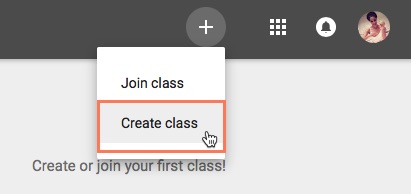
to do is create a class. Click the Plus icon in the top-right corner, and then
select Create class.
This will bring up a dialog box asking if you're planning on
using Google Classroom at a school with students. Google Classroom requires
schools to use G Suite for Education if their teachers plan to use it in their
actual classrooms. This provides teachers and students with more privacy and
security measures. If you're using Google Classroom for your own personal use,
you won't need to worry about this.
You'll then need to enter the name of your class. There's
also the option to enter a Section, Subject, and Room if you're using Google
Classroom in a school and want to include this information. When you're done,
click Create.

well written blog. viewers can easily catch up the steps to create a google classroom as you have mentioned steps in your blog.
ReplyDeletethanks tashi
ReplyDeletegood write up. i enjoy reading your blog as it is relevant to our day to day life. i like the way you share importance or advantages of using blog
ReplyDeletekeep it up
beautifully written... i enjoyed reading your blog and gain a lots of information...thank you for sharing
ReplyDeleteGlad to know that you have learnt a lot of things from ICT class. You did even mention that we can create goggle classroom to discuss problem, providing extra information, and we can give work online whereby they they can do online. not only that we can clear their doubt whenever we can time. it was well reflected and well organised.
ReplyDeletewell reflected. after going through your reflection I can say that use of google classroom can make teaching and learning effective not only within that four walls. We can clear their doubt whenever we can from any where. worth reading..
ReplyDelete